Electronic documents parameters
The Electronic documents parameters (MEM IT) page collects the general operating parameters of the app, configured separately for each legal entity. This page is the complete reference of the available fields, grouped by tab as in the page, and of the related actions.
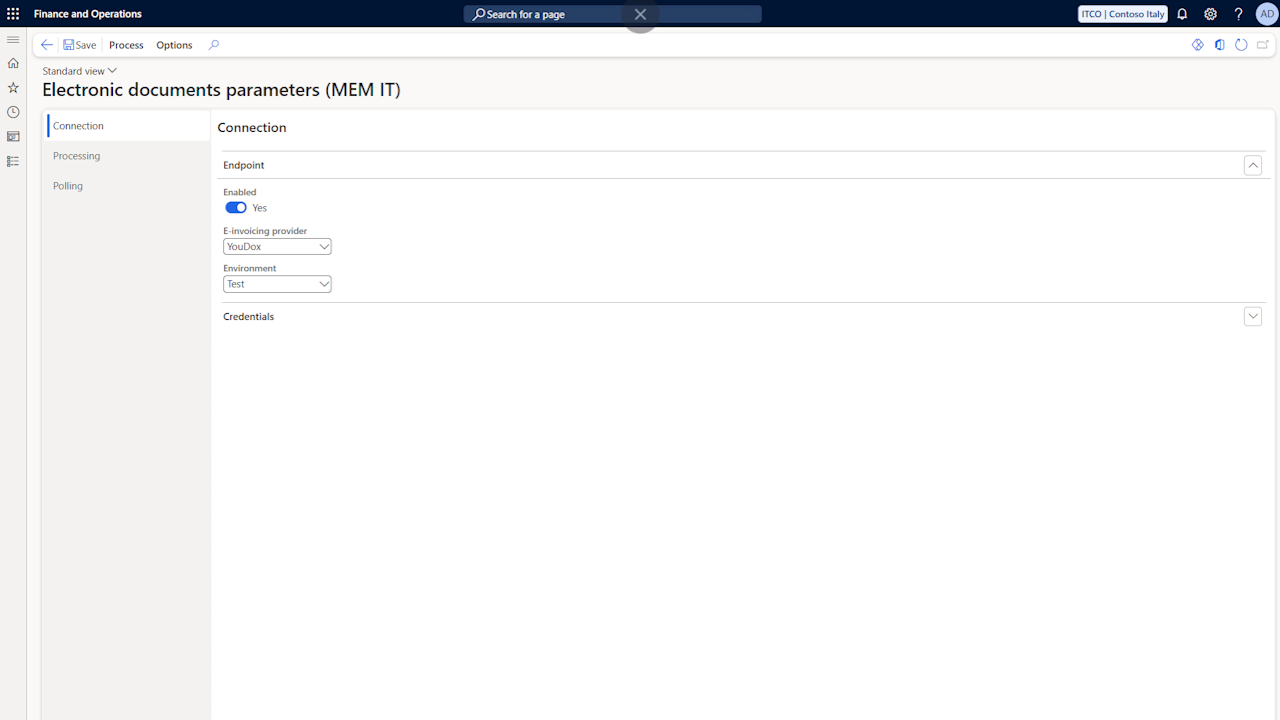
Connection
Enabled: manages the general activation of the electronic documents management functionality in the current company.
E-invoicing provider: indicates the provider used to exchange documents with the SdI.
Environment: indicates whether the test or the production environment of the provider is used.
User name, Client ID and Password: the credentials to authenticate with, provided during the activation of the service.
Electronic Invoicing Group: to be activated when multiple companies (legal entities) share the same credentials on a single account.
Note: the password must be entered again after the database is copied to another environment.
Processing
Sent invoices
Sending start date: if populated, only the documents posted with a date greater than or equal to the configured one are staged for the electronic sending.
Tax scheme: the tax regime of the company (tag RegimeFiscale), exported in the header of the XML file.
Send foreign customers: if enabled, the sending is activated also for the documents of foreign customers; otherwise only the domestic customers are considered. For the configuration of the foreign customers see the Standard data setup page.
Manage reverse charge documents: activates the sending process of self invoice and reverse charge purchase documents, described in the Self invoices and reverse charge page.
Attach invoice printout: if enabled, the system inserts as attachment (Allegati section) the print of the invoice rendered with the stylesheet.
Causale source: manages the population of the Causale tag of the exported documents. The available options allow exporting no causale, the fixed description, or the external notes of the source document.
Fixed causale description: fixed description to be inserted in the causale of the document, useful for example to configure the CONAI text.
Empty line description: electronic invoicing specifications require the description field to be mandatory. Any empty lines are transmitted inserting in the description of the electronic document the text configured in this field, to prevent rejections (for example a dash or the text "Additional Line").
Item number source: by default the GTIN of the item, if populated, is exported in the CodiceArticolo section of the invoice lines. Setting the field to the item number option, the internal item number is exported instead (with type ARTICOLO).
Received invoices
Create document automatically: if enabled, when a retrieved document is correctly resolved to a vendor, the pending vendor invoice is created automatically; a document that cannot be created remains open in the received documents list.
Vendor group for new vendors: the vendor group assigned by the Create vendor action to the vendors created from the received documents.
Method of payment for new vendors: the method of payment assigned by the Create vendor action to the vendors created from the received documents.
Cassa previdenziale category: the procurement category used for the social security contribution lines (DatiCassaPrevidenziale section) of the received invoices; its posting setup supplies the ledger account. If empty, the contribution lines are not created and the difference is highlighted by the totals matching.
Stamp duty
- Stamp duty threshold and Stamp duty amount: if the threshold is populated, when the total of the zero rate operations of an invoice reaches the configured threshold, the DatiBollo section is exported with the configured stamp duty amount.
Polling
- Last status request and Last received request: report the last time the updated status of the sent documents and the received documents were requested. The values are used as the starting point of the next requests.
Page actions
Test connection: verifies the configured credentials against the provider's systems.
Create default configuration: creates the default data of the app (document types, natura codes, fattura codes, text transliterations and the CIG and CUP invoice property types) and downloads the stylesheet used for the visualization of the documents. The action only adds the missing entries and can be repeated safely.
Import stylesheet: replaces the stylesheet used for the visualization of the documents with a custom file, for example a newer AssoSoftware release.
Electronic document fattura codes (MEM IT): opens the table containing the payment method (MP) and payment terms (TP) codes provided by the Italian Revenue Agency, used in the mapping described in the Standard data setup page. The values are created by the Create default configuration action and can be extended when new codes are published.
SDI status mapping (MEM IT): opens the mapping table where to configure the status that must result in the system for the values returned by the preservation portal, with the description shown as external status on the outbound documents. It is recommended to create the default values through the Create default configuration action.
Text transliteration (MEM IT): allows configuring the automatic conversion of some characters, commonly used but not valid in the electronic invoice format, into allowed characters (for example ü into u). The default conversions are created by the Create default configuration action.
Open provider portal: opens the preservation portal, where it is possible to consult and verify the history of the performed communications.