Purchases
The purchase process consists of the following steps:
Retrieval of the received documents from the intermediary's system, automatically or manually.
Resolution of the vendor, automatic when the identifiers of the sender match a vendor.
Creation of the pending vendor invoice, with lines, attachments and totals.
Posting of the invoice in the usual way; the received document is linked to the posted invoice.
Sending of the conservation protocol: the registration references are reported to the preservation system.
Receiving the documents
The received documents are listed in the Inbound electronic documents (MEM IT) page. The documents are downloaded through the Retrieve documents action, or automatically through the Download received electronic invoices batch job; each request downloads only the documents received since the last successful request.
Through the Import file action it is also possible to manually import a single XML file or a ZIP folder containing multiple XML files, for example coming from the archive of a previous provider. The conservation protocol is not applicable to the manually imported documents.
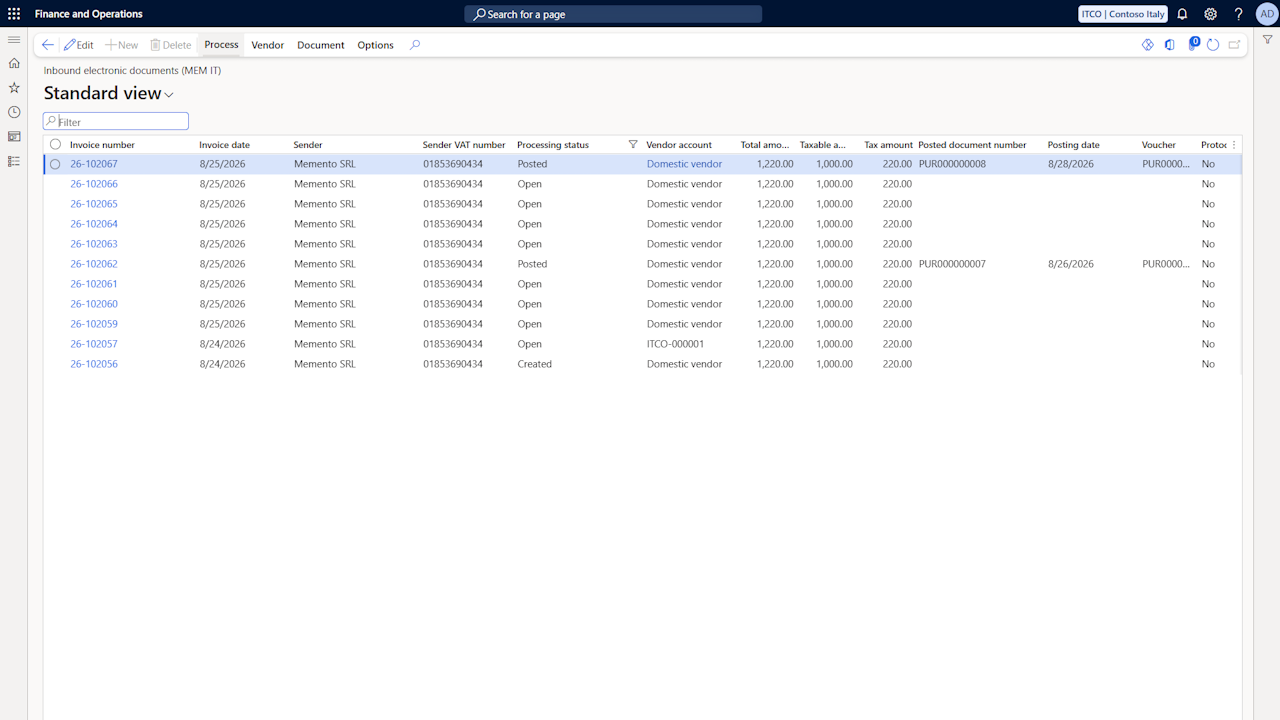
The possible statuses of the received documents are:
Open: the document is ready for the creation of the vendor invoice.
Vendor missing: the sender could not be resolved to a vendor.
Created: the pending vendor invoice has been created.
Posted: the vendor invoice has been posted; the posted document number, the posting date and the voucher are reported on the received document.
Self-billed invoice: the document is one of the company's own reverse charge integrations, routed back by the SdI (see the Self invoices and reverse charge page).
The list shows the total, taxable and tax amounts declared in the XML file; the status of the documents in Vendor missing is highlighted in red. Only the Vendor account field can be modified: assigning the vendor manually sets the document to Open, clearing it sets Vendor missing.
Clicking the invoice number, or the Details action, opens the document details.
Vendor resolution
The vendor is resolved based on the VAT registration number or the fiscal code (see the Standard data setup page). The following actions are available:
Assign vendor: repeats the automatic resolution for the selected documents.
Create vendor: if the vendor is not available in the system, creates the vendor card reporting the main values from the electronic document, including the bank account created from the payment coordinates; the card is opened for the manual completion. The defaults applied are configured in the parameters (Vendor group for new vendors and Method of payment for new vendors).
Create bank account: creates the bank account from the payment coordinates of the document on an already existing vendor; an account with the same IBAN is reused.
Document details
The Electronic document details page shows one received document in full: the header data, including the linked invoice of a credit note and, after posting, the posted document references, and the document lines with the result of the line mapping resolution.
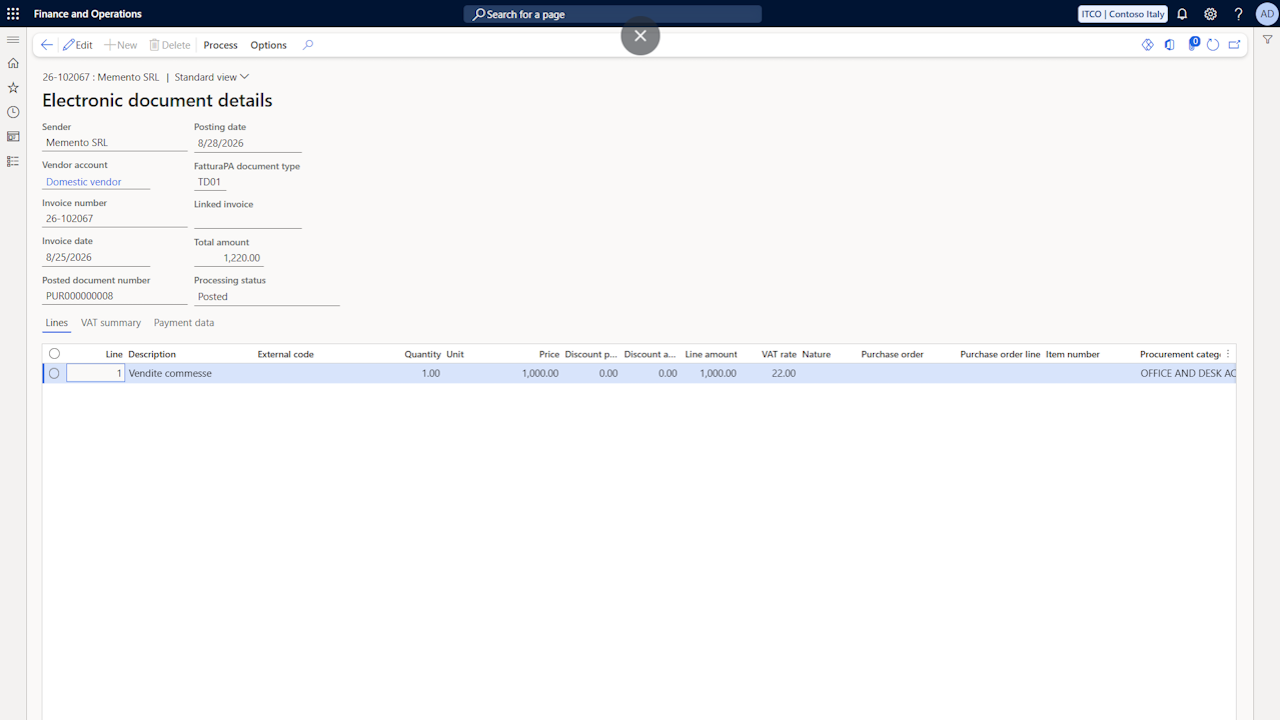
On the Lines tab, the Item number, Procurement category and Item sales tax group columns are editable: lines the rules could not resolve can be completed here before creating the invoice. The other columns report the XML data and are read only.
The VAT summary tab shows the DatiRiepilogo rows of the file: rate, nature, taxable amount, tax amount and VAT chargeability.
The Payment data tab shows the payment instalments: method of payment code, due date, amount and IBAN.
The Execute mapping action reapplies the mapping rules to the document, rebuilding the lines and overwriting any manual completion; on a document without vendor, the vendor resolution is repeated first. The lines are also rebuilt automatically when the vendor of the document changes.
The vendor can be changed directly in the header, and all the actions of the list are available on the page.
Document creation
The Create document action generates a pending vendor invoice from the received document, using the lines shown in the document details, manual completions included; the action can also be launched for multiple selected documents. During the creation:
The lines referencing a purchase order of the company (DatiOrdineAcquisto section) are matched to the purchase order lines, by line number or by price within the configured tolerance; the standard matching then applies.
The other lines carry the item or procurement category resolved by the line mapping rules, or completed manually in the document details. A line without an item, a category or a purchase order match blocks the creation.
The received credit notes (document types TD04 and TD08) are created as pending vendor invoices with negative quantities and amounts, according to the Finance & Operations convention; the reference to the corrected invoice (DatiFattureCollegate section) is reported in the invoice description.
The discounts and surcharges (ScontoMaggiorazione) and the social security contributions (DatiCassaPrevidenziale) are reported on the created document.
The XML file, its visualization with the stylesheet and the attachments embedded in the file (Allegati section) are saved as attachments of the invoice.
The totals declared in the XML file are reported in the imported totals of the invoice, compared with the calculated ones through the standard totals matching (see the Standard data setup page).
The Create only header action creates the invoice with the header data only, leaving the lines to the manual entry.
The Open document action opens the pending (or posted) invoice created from the received document; the same navigation is proposed upon creation. If the pending invoice is deleted, the received document returns to the Open status.
Through the Link existing document action it is possible to connect a received document to a vendor invoice already posted manually, as an alternative to the creation.
Posting and conservation protocol
Upon posting, the received document is updated with the posted document number, the posting date and the voucher. From the posted invoice, the dedicated Italian Electronic Invoicing tab allows viewing the received document and navigating back to it.
Through the Send conservation protocol action, or the Send conservation protocols batch job, the registration references of the posted documents are reported to the preservation system, completing the legally compliant preservation of the received documents.
Viewing the documents
The View invoice action, available on the received documents page and on the posted invoice, displays the received document applying the configured stylesheet; the Download XML action downloads the original XML file.