Sales
The sales process consists of the following steps:
Posting of the sales documents in the usual way. Based on the configurations, during posting the documents are staged for the sending to the SdI.
Sending of the documents to the intermediary's system, which manages their preservation and the sending to the SdI.
Management of the outcomes related to the status of the documents on the SdI.
The described activities can be executed automatically through the batch jobs or manually. It is initially recommended to send the documents to the external systems manually, and to activate the automatic procedures only after the configurations have been validated (see the Monitoring and automation page).
Document preparation
The FatturaPA document type field is available in the header of the sales orders and of the free text invoices. Left empty, the document type is resolved automatically during posting (TD01 for invoices, TD04 for credit notes); it can be populated manually before posting to manage the other applicable cases.
The purchase references of the customer are exported in the DatiOrdineAcquisto section, read from the following header fields, to be populated before posting:
On the sales order: Customer requisition (exported as IdDocumento), Customer order date, Tender procedure code (CIG) and Project code (CUP).
On the free text invoice: Customer order number, Customer order date and the same CIG and CUP fields.
Note: on an invoice already posted but not yet sent, the values can still be corrected through the standard Electronic invoice properties action of the posted invoice, whose values have priority over the header fields. The CIG and CUP property types are created by the Create default configuration action.
Invoices to the Public Administration
The invoices towards the Public Administrations follow the ordinary sales process, with the following specificities:
The 6 character office unique code of the administration must be entered in the Authority office field of the customer (see the Standard data setup page).
The CIG and CUP codes and the customer order references must be populated in the header of the document before posting, as described in the previous section.
For the administrations subject to split payment, configured through the standard sales tax setup, the VAT chargeability is exported accordingly (EsigibilitaIVA with value S).
Unlike the B2B documents, the Public Administrations can accept or reject the received documents: the outcome is reported in the status and in the history of the document like the other SDI messages.
Document staging
During posting, the presence of the data required for the electronic invoicing is verified for the documents in scope; a blocking error is returned when data is missing, for example a method of payment without its FatturaPA code.
During posting, the documents are staged for the sending when the app is enabled in the company (eg. the posting date is not prior to the Sending start date and neither the sales tax group nor the sales tax book section of the document is excluded).
Sending to the Sistema di Interscambio
The staged documents are listed in the Outbound electronic documents (MEM IT) page, with the current status and the last message returned for each document.
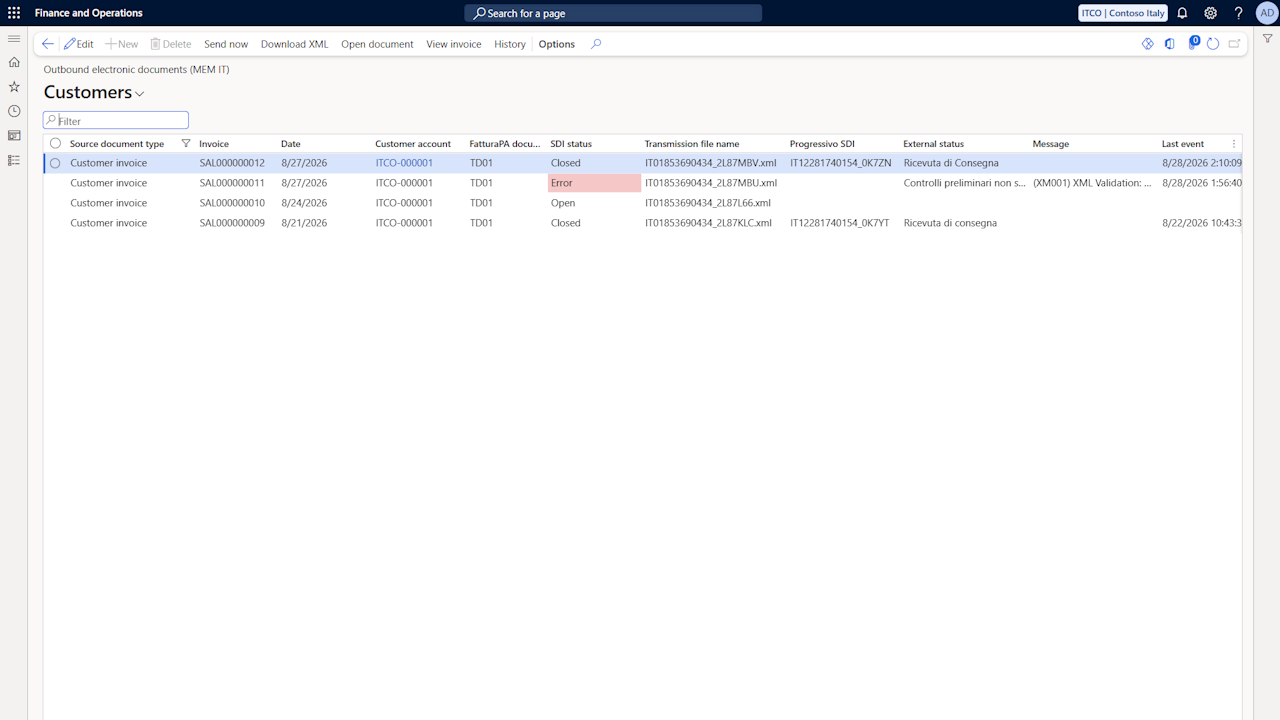
The possible statuses are:
Open: the document is waiting to be sent to the SdI.
Sent: the document has been sent to the SdI and an outcome is expected.
Error: errors occurred while sending the document, for example a rejection by the SdI.
Closed: the document has been correctly processed by the SdI.
The main actions of the page are:
Send now: generates the XML file and sends the selected documents to the intermediary's system. The sending can also be launched for multiple selected documents.
View invoice: displays the document applying the configured stylesheet.
Download XML: downloads the generated XML file.
History: opens the chronological history of the events of the document.
Open document: opens the posted document the entry originates from.
The page also shows the External status column, reporting the last status received from the intermediary with the description configured in the SDI status mapping, and the timestamp of the last update. The status of the documents in Error is highlighted in red.
The same information and actions are also available directly on the posted sales invoice, in the dedicated Italian Electronic Invoicing tab of the card and in the columns of the posted invoices list.
Outcome management
The SdI, after taking charge of the document, communicates the processing outcome, which can be:
Delivery receipt: the document has been correctly delivered to the counterparty. The document status is updated to Closed.
Rejection notification: the SdI rejected the document. The document status is updated to Error and the rejection message is available in the Last SDI message field and in the history; after correcting the cause, the document can be sent again. The new transmission clears the external status and the SDI identifier of the previous one.
Failed delivery notification: the SdI could not deliver the document to the counterparty; the document is in any case correctly processed on the SdI and made available to the recipient in its reserved area of the Italian Revenue Agency portal.
The outcomes are retrieved from the intermediary's system through the Retrieve electronic invoice statuses batch job and update the status of the documents according to the SDI status mapping (MEM IT) configuration.
For B2B invoicing the acceptance or rejection of the documents by the recipient is not allowed, this option being reserved to Public Administrations only.
Virtual stamp duty
When the Stamp duty threshold parameter is populated and the total of the zero rate operations of the invoice reaches the threshold, the DatiBollo section is exported in the XML file with the amount configured in the Stamp duty amount parameter (see the Electronic documents parameters page).