Line mapping
To automate the creation of the pending vendor invoices starting from the received XML files, the app provides a set of mapping rules that allow automatically resolving the procurement category and the item sales tax group of the lines. This page describes the available configurations; their use in the process is described in the Purchases page.
The Electronic documents line mapping (MEM IT) page is available in the Accounts payable menu; it can also be opened, already filtered to the vendor, from the inbound documents pages and from the vendor card.
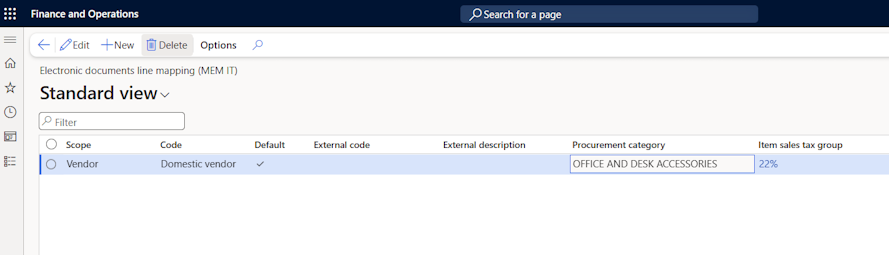
Mapping rules
Scope and Code: indicate whether the rule applies to a single vendor or to a vendor group, and the related code. The rules of the vendor are evaluated first; the rules of the vendor group are used when the vendor has no matching rule.
Default: if enabled, indicates that the rule is the one to be used in the absence of more specific rules.
External code and External description: the values to be matched against the item code (CodiceArticolo) and the description of the received line. The values can be specified using the "*" and "?" wildcards.
Category: the procurement category to be reported on the created invoice lines; its posting setup supplies the ledger account.
Item sales tax group: the item sales tax group to be reported on the created invoice lines. If empty, the group is resolved through the Default for Italian Electronic Invoicing flag based on the VAT rate and nature of the line (see the Standard data setup page) or, as a last resort, from the defaults of the category.
Note: for most vendors a single rule with the Default flag, the category and, when needed, the item sales tax group is sufficient.
Line resolution
For each received line without a purchase order reference, the system resolves the line data in the following order:
If the item code communicated by the vendor (CodiceArticolo) is registered among the External item descriptions of the vendor, the line is created as an item line.
The rules of the vendor whose External code or External description matches the line.
The rule of the vendor with the Default flag.
The same evaluation, repeated on the rules of the vendor group.
If a line cannot be resolved, the creation of the document is blocked and the received document remains open. The line can then be completed manually in the document details, or a mapping rule can be added and the mapping executed again.